
TL;DR
- One web app on an Ubuntu box, one Windows gaming PC with an RTX 4080 doing the AI work, a plain SQLite database. No cloud servers, no Kubernetes.
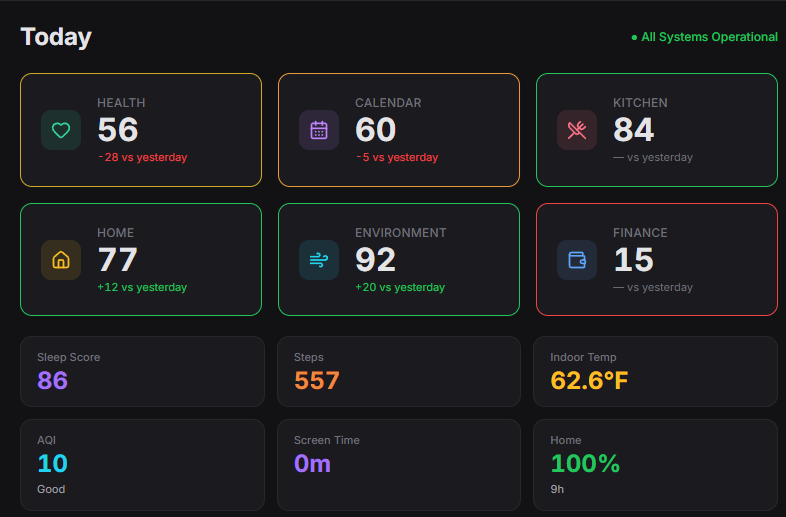
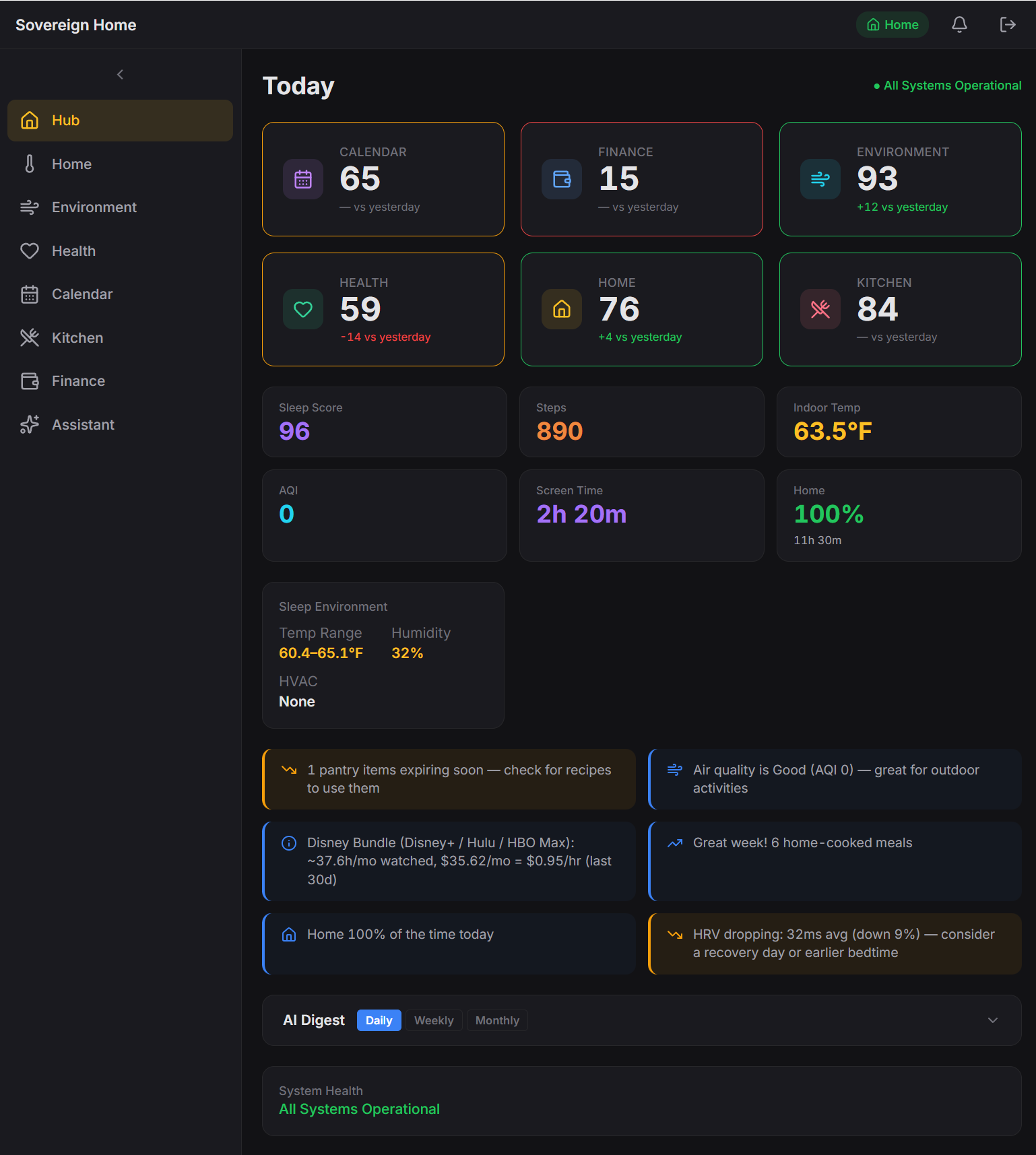
- Six parts of my life on one dashboard: the house (thermostat, screens, lights), money (YNAB), health (Fitbit, Oura, Cronometer), kitchen (25k recipes, pantry, meal planning), outdoor air quality, and calendar.
- Anything personal is answered by a local AI running on my own GPU. Anything general goes to Gemini. Every feature is tagged upfront with which side it can talk to, so a personal question can’t accidentally leak to the cloud.
- Four months of nights and weekends, starting January 2026. Two things I broke along the way cost me real time. They’re the most useful stories in the post.
The problem I was trying to solve
When I started this in January, the whole project fit on one page. Three rules, three features: check the weather in my town, change the thermostat, look up what I’d logged in a private journal. The rules were:
- Privacy: (all personal, family, and financial data stays on a local encrypted drive),
- Practicality: (“every feature must serve a household purpose, no novelty stuff,” written into the charter on day one), and
- Scalability: (don’t hardcode brand names, so I can swap Feit bulbs for Philips Hue without a rewrite).
Four months later the three starter features are now about ninety. The two machines are still two machines. The three rules have held. This post is about how that works.
The surface reason was simple. The data about my own life lives in different vendor apps. YNAB has my money. Fitbit has my activity. Oura has my sleep. Cronometer has my nutrition. Google has my calendar and all of my smart home devices. I had a 25,000-recipe collection from an older project sitting on a backup drive doing nothing. I wanted one dashboard that could show all of it at once.
The deeper reason is the merged view. Each of those feeds is privacy-sensitive on its own. But put them together and you get something more revealing. YNAB plus Fitbit plus Cronometer plus Oura plus Google describes when I’m home and when I’m away, when I travel, what my daily routines look like, how I recover from a bad night of sleep, or how my eating or spending shifts when I’m stressed. Each feed alone is a data point. Stitched together they’re a profile of how I live, detailed enough that I don’t want any single cloud service holding it, much less five of them in parallel. I’m fine with Fitbit seeing my steps and YNAB seeing my transactions. I’m not fine with any company holding the merged view. So the merged view lives in my house. The individual feeds still come from cloud services, but the part that reveals how I live my life never leaves the LAN.
Architecture, in one picture
┌────────────────────────────────────────────┐
│  Webserver (Linux)                         │
│  ─────────────────                         │
│  Web dashboard                             │
│  Database (two files: home + kitchen)      │
│  12 scheduled jobs (thermostat, budget,    │
│    sleep, nutrition, calendar, etc.)       │
│  ~90 AI features the chats can call        │
└─────────────┬──────────────────────────────┘
              │   shared drive
              │
┌─────────────▼──────────────────────────────┐
│  Gaming Rig (Windows, RTX 4080)            │
│  ─────────────────                         │
│  Local AI via Ollama:                      │
│    qwen3:14b (general personal queries)    │
│    chef (custom cooking model)             │
│  Knowledge index for recipes and cooking   │
└────────────────────────────────────────────┘
              │
              │   private mesh VPN
              ▼
       (only my devices, from anywhere)
Two machines. The “body” is the web server: it runs the dashboard and holds all the data. The “brain” is my Windows gaming rig, whose graphics card does all the AI work and whose encrypted drive holds the private vault. The brain exists because a beefy GPU is much more powerful than the Ubuntu server I run on an old laptop.
The dashboard URL isn’t public. It sits behind a private mesh VPN I run with Netmaker and WireGuard, which means only devices I’ve personally enrolled can reach it. From my laptop, desktop, or phone, it works like any website. From anywhere else on the internet, it doesn’t exist.
Why not just use Home Assistant?
I do use Home Assistant. It’s excellent at turning lights on. It’s less excellent at telling me, in one sentence, that I slept badly last night and also spent $400 at Costco on Saturday. The pieces exist (YNAB here, Oura there), but stitching a question that spans all of them is a lot of template gymnastics. I wanted something I could read end-to-end on a Saturday, not a maze of config files.
There’s also the way I wanted to work. I ran the whole project as a series of small user stories, each one documented, built, and checked in before the next. Sprint 1 (January) was four database tables and three features. Sprint 2 added the thermostat. In March I migrated an old recipe collection I’d been meaning to revive into the new system over a single weekend. In April, once the back end had outgrown its original templates, I rebuilt the entire front end in Svelte, one part of my life at a time. Kitchen first, then the rest. Each was a small, self-contained piece of work. That loop is easy when I own the project. It would have been a much harder sell on top of someone else’s framework.
How does the local-vs-cloud privacy split work?
Every AI feature in the system carries one of two labels.
Local only: The feature touches personal data (pantry contents, transactions, sleep logs, etc.) and is answered on my own GPU by Ollama running qwen3:14b for most personal queries, plus chef, a cooking-focused model customized on top of qwen3:14b with a culinary modelfile I wrote myself. It never goes to the cloud. If the local model is down, the request fails rather than quietly falling back to the cloud.
Cloud allowed: The feature is about general knowledge (a cooking technique, a piece of research) and is routed to Gemini, with the local model as fallback. Nothing personal is in the question, so the fallback direction is the safe one.
Labels are set when the feature is written, not chosen at query time. If any part of answering a question touches a local-only feature, the whole answer stays local. “How do you stir fry crispy tofu” goes to Gemini. “Suggest dinners from what’s in my pantry” stays home. I can’t accidentally leak personal data by phrasing a question cleverly, because phrasing isn’t what decides the routing. The labels are.
Why MCP, and what I use it for
MCP (Model Context Protocol) is a standard that lets an AI model call named tools instead of trying to answer everything from memory. In my case the model isn’t guessing at my pantry contents or my bank balance; it’s calling get_pantry_items or get_account_summary and getting live data back. That sounds like a small distinction but it’s the whole enchilada. A hallucinated data point is useless. A queried data point is useful.
I settled on MCP specifically because it meant I could wire up the tools once, use them from my chat interface, and reuse them inside scheduled jobs. The same get_sleep_last_night call the morning briefing job makes is available inside the chat. There’s no separate integration path per AI client. Write the tool, tag it with a privacy label, and it’s available everywhere.
How do all these different sources end up in one place?
Small scheduled jobs pulling data at different cadences, all writing into the same local database. Every five minutes a job checks which screens in the house are on. Every fifteen, the thermostat and outdoor air quality. Every four hours, new bank transactions. Twice a day (mid-morning, once the services have settled last night’s numbers) sleep and activity data. Overnight, the local AI reads the whole day and writes a summary that’s waiting when I open the dashboard with a cup of coffee.
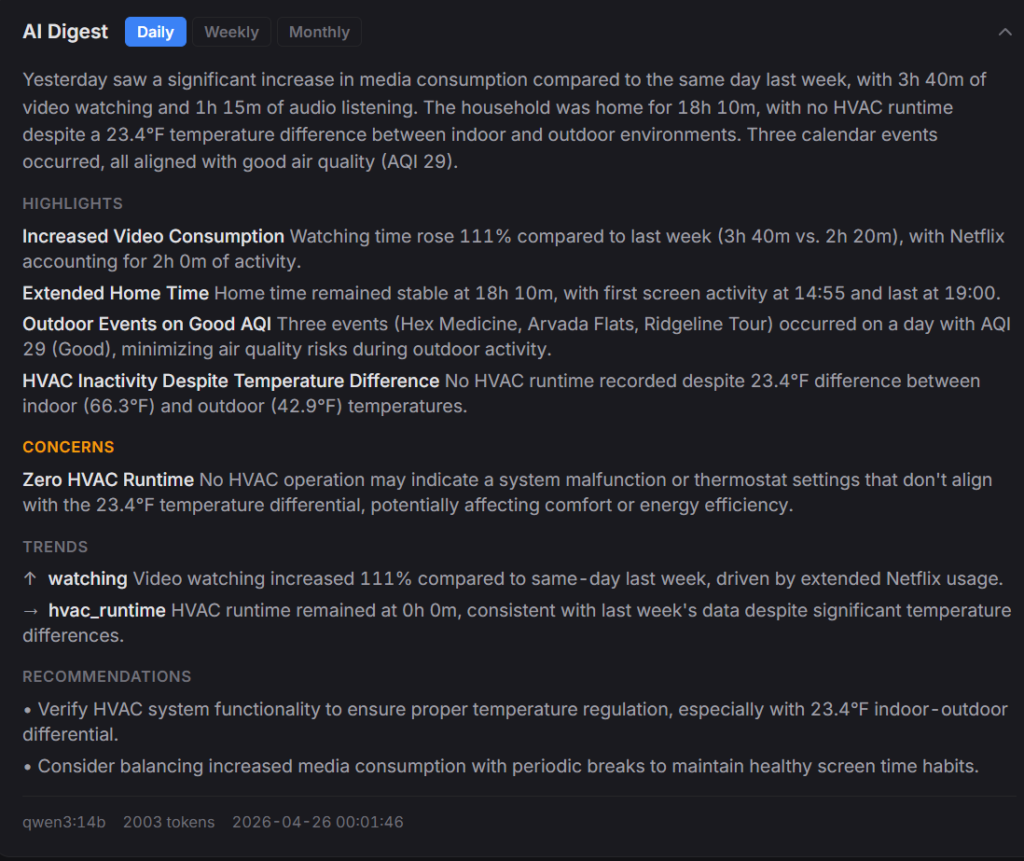
When I ask a question that touches multiple parts of my life, the system gathers a small, relevant slice first: today’s thermostat reading, last night’s sleep, the active meal plan, what I cooked this week. That compact brief goes to the local AI, which answers using only what it’s been given. Handing the AI ten thousand rows is worse than handing it the twenty-five that it needs to answer the question.
Two things that broke, and what they taught me
I didn’t set the time zone on my server. Any time I asked the code “what day is it?”, it answered with the server’s default of today, not mine. Around 5pm my time, the finance dashboard would flip to “tomorrow” and show an empty screen. I’d refresh, assume something had broken with the bank sync, and start digging. It was never broken. Time zones…amirite?
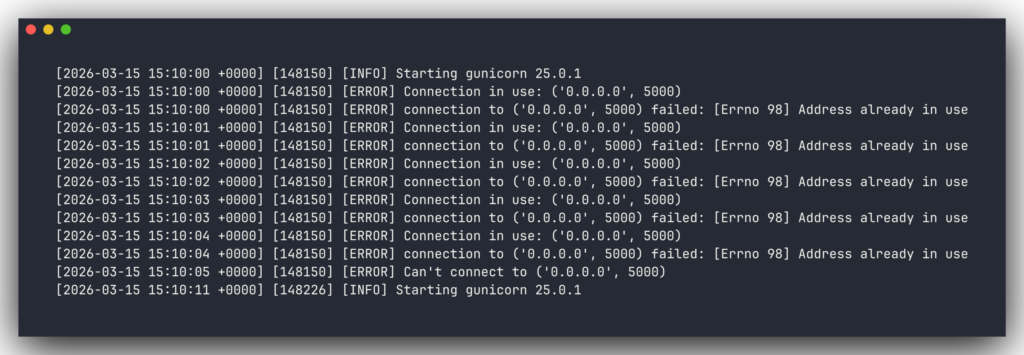
I started the web app by hand one night and forgot to close it. The process kept running after I closed my laptop. Overnight, the real production server tried to restart for an unrelated reason and couldn’t, because the port was already taken by me hours earlier. It retried almost eight thousand times before I noticed. The lesson, in bold at the top of my instructions file now: never start the web app manually.
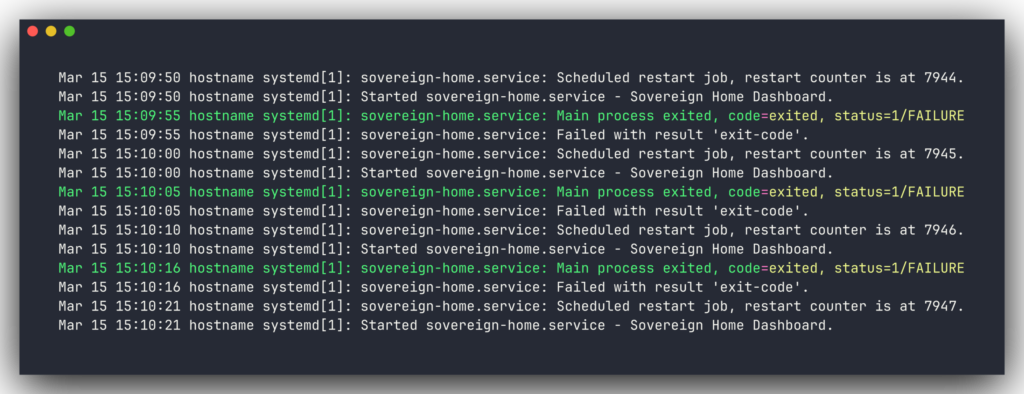
I’ve got about twenty more notes like these saved. The point of writing them down is that the next version doesn’t have to re-learn anything from scratch.
What I use it for
Four things earn their keep daily. If any one of these wasn’t useful, the rest of the stack wouldn’t justify itself.
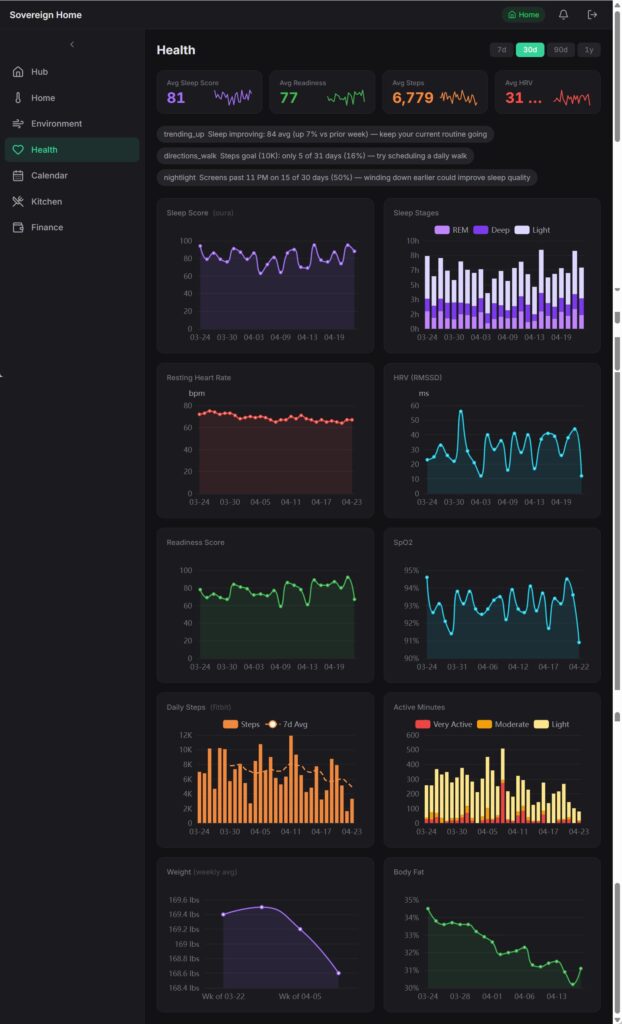
The morning briefing
Overnight, the local AI reads yesterday’s data from every domain and writes a summary. It’s waiting when I open the dashboard with my coffee. How I slept, how my body composition is trending, how much I spent and in which categories, how long the heat or A/C ran and what the outdoor temps were, what I cooked, whether any pantry items are about to expire, overnight air quality, what’s on my calendar. One page. Ten seconds to read.
The finance section of the briefing is currently the most useful to me. It’s not a full accounting report; it’s a pulse check. How much I’ve spent so far this month versus the budget, which categories are running hot, whether any transactions hit overnight that I wasn’t expecting. The local AI flags anything that looks like an outlier and skips the rest.
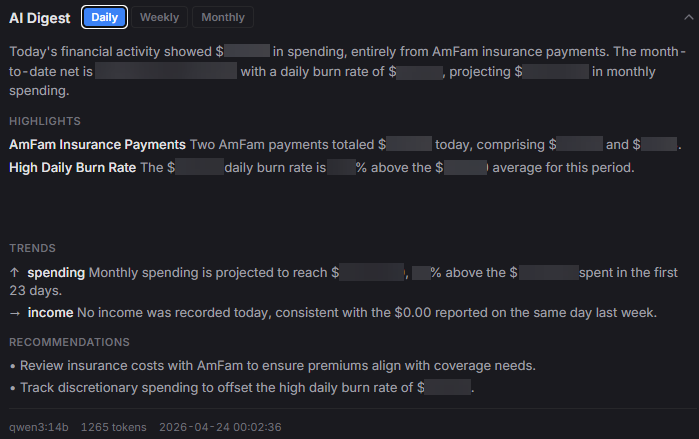
It replaced the habit of checking four separate apps every morning and remembering none of it. I don’t need every detail every day. I need the shape of yesterday. The detail is one click away when something looks off.
Meal planning that respects the pantry
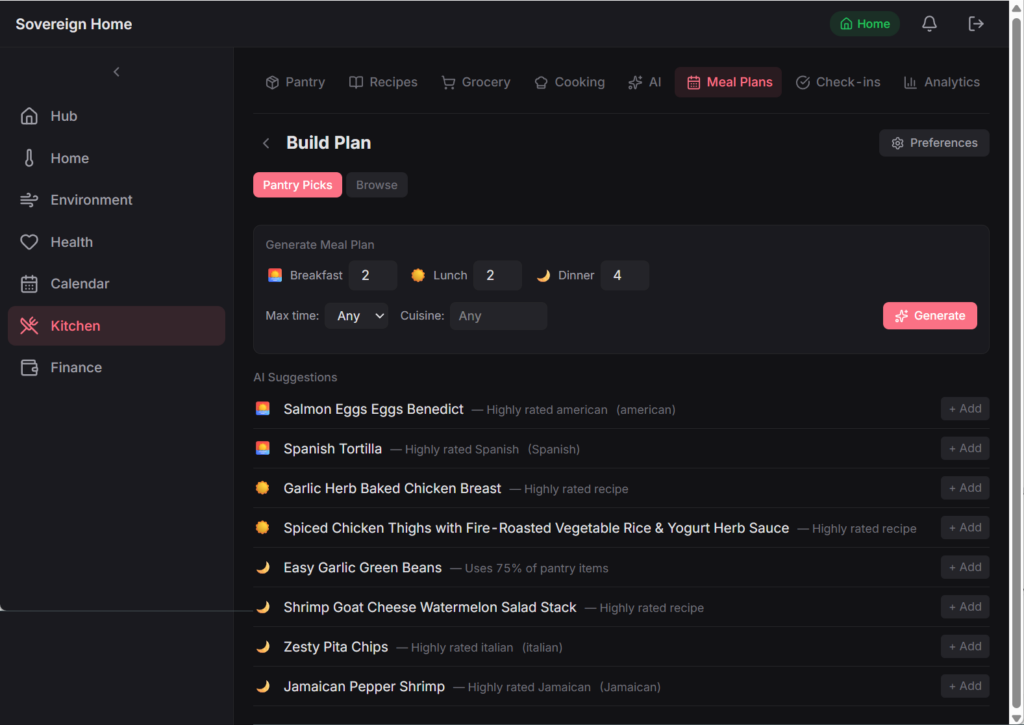
A three-step flow I borrowed from Mealime. I set the ground rules for the week (how many dinners, how many servings, any dietary constraints). The AI proposes a week of meals, scored by what’s already in the pantry, how varied the cuisines are, and what I cooked recently. I can swap any slot with a free-text constraint like “something lighter with a grain bowl.” The grocery list generates automatically, with pantry-covered items pre-checked and partial stock flagged.
When I cook a planned meal, one tap marks it cooked. That single tap logs the cooking session, subtracts the ingredients from the pantry, and quietly records the conditions: indoor temperature, outdoor temperature, my sleep and readiness scores that morning. Each session becomes a small data point. I didn’t plan to use those for anything. They just started being useful once they existed.
One-tap dining-out reconciliation
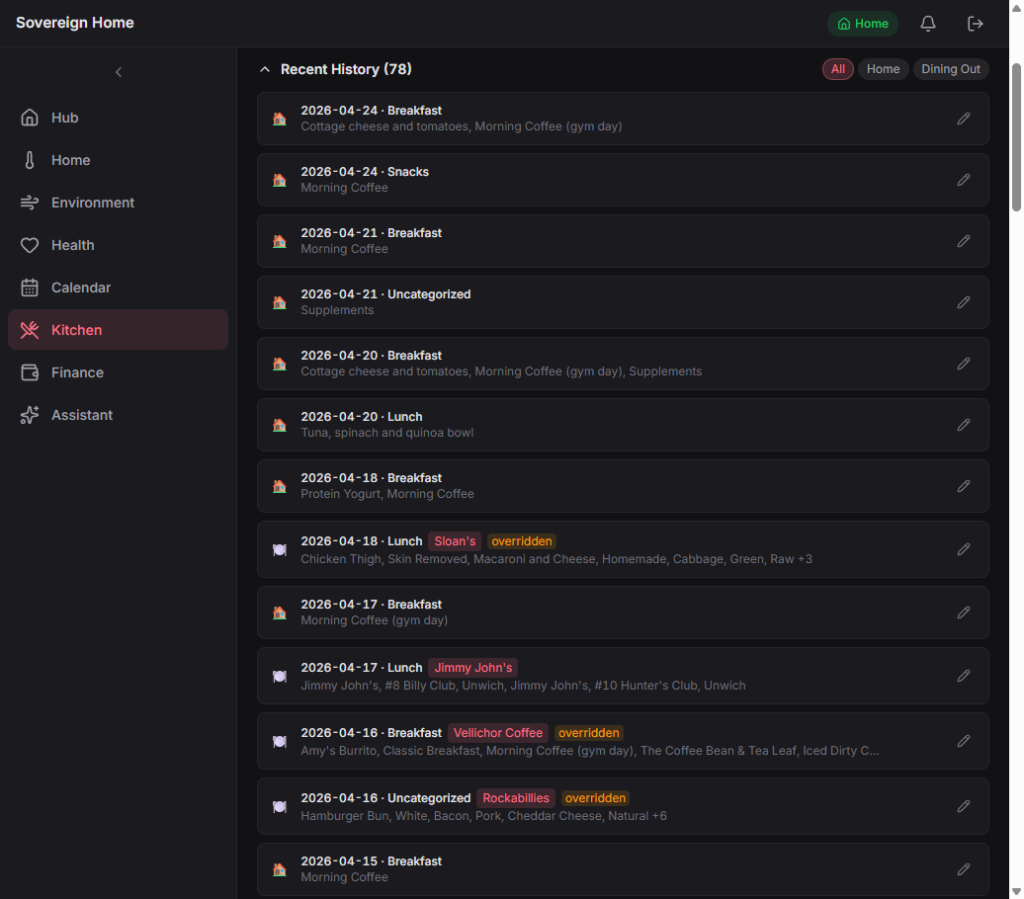
This is the fancy one. I log meals in Cronometer for the macro data. Every night the system pulls those meals in, figures out which were cooked at home and which were eaten out, and for the eat-out ones, checks my bank transactions from the last couple of days to match each meal to the restaurant charge.
In the morning the dashboard shows a stack of pending check-ins: “Monday dinner: Randi’s Pizza, $32.14. Is that what you had?” One tap confirms both sides. The meal log is marked as eaten at that restaurant, and the bank transaction gets tagged with the right budget category. Now both sides stay clean, which means the monthly budget projections and the “what did I eat vs. how did I sleep” correlations are working with real data instead of garbage.
Asking questions across everything at once
The built-in chat is what I use most. A few real questions from this week:
- “Suggest three dinners from what’s in the pantry that take under 30 minutes.” (The system ranks my saved recipes by how much of each I already have, nudged up by which ingredients are about to expire.)
- “What’s my debt payoff timeline look like if I put an extra $200 a month toward it?” (It runs the numbers against pre-computed scenarios and shows the projection in real time.)
- “Which nights this month did I sleep poorly, and what did I eat for dinner those days?” (It pulls the sleep data and the cooking data and answers without me leaving the chat.)
- “What’s about to expire in the pantry?”
- “How much have I saved this quarter by cooking at home instead of eating out?”
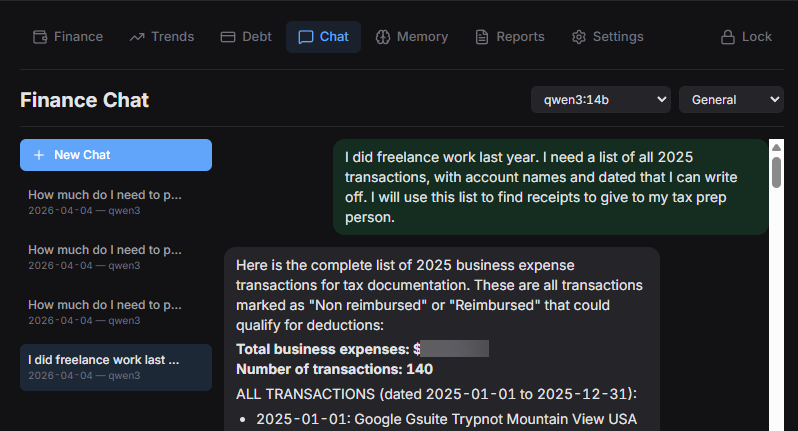
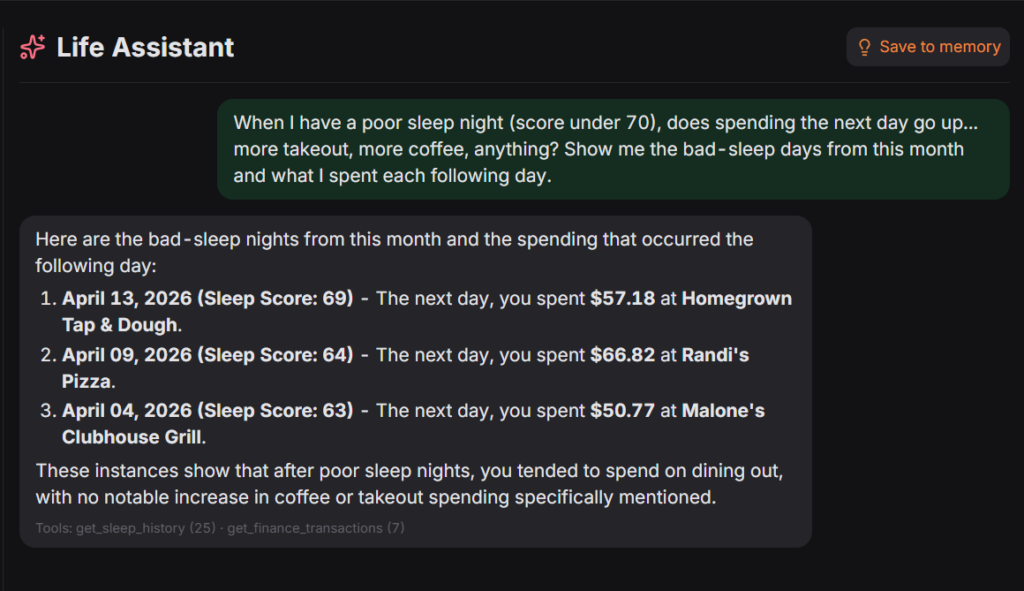
None of those questions left my home network. That’s the difference that made every other decision in this project worthwhile.
What I’d do differently
A few things, in no particular order.
The original front end was a mix of old templates and vibe-coded JavaScript. When I opened the project in April and realized I’d reinvented the same pattern in three places, I started a clean rebuild. Kitchen first, then the rest in order of how often I open each page. It’s slow, patient planning and design.
I’d also build monitoring and system health checks from day one, not piecemeal after every outage. Both of the bugs above share a shape with a problem currently sitting on my backlog: something quietly stopped working, and I only noticed because I happened to look at the right dashboard card. The backbone of a system like this isn’t the features. It’s the thing that tells me when the features are bullshit.
And I’d set up automated AI output testing from the start, not after the first painful model swap. The local model has changed twice since January (Llama 3.2, then Mistral, then qwen3:14b), and each move meant comparing outputs against a list of my own real questions by hand. Fine once, tedious twice, and intolerable at scale. The same test would also catch a slower problem: silent quality drift when I tweak a prompt.
FAQ
Is it actually 100% local?
No, and I don’t intend it to be. General-knowledge questions are routed to Gemini. Fitbit, Oura, YNAB, Google Calendar, and Nest all require cloud services because that’s where those companies keep the data. The joined picture of my money, my sleep, and my kitchen only ever lives in my own database and runs on a local LLM.
Why a smaller AI model and not a huge one?
I tested a few on my own questions and settled on a mid-size one (about 14 billion parameters). It was better at using the tools I’d given it and fits comfortably on my hardware. The model slot is easy to swap. I’ll change it when I find something better.
How long did this take?
About four months of weekends and weeknight evenings, starting in January 2026. It may never be finished. Not recommended if you’re trying to optimize anything other than your own curiosity.
Why not use OpenClaw?
OpenClaw is chat-first and action-oriented, built around an agent with broad system access that lives in your messaging app. I can “roll your own” for free with a local model and a few scheduled scripts.
The security model was the bigger issue for me. Security researchers found over 135,000 exposed instances at peak in February 2026, with 63,070 still confirmed live as of March 31. My data never touches the internet. No skills marketplace, no community code with system access, no agent browsing the web with my bank credentials in scope.
One question I’m still unsure about: when a system like this has to authenticate different kinds of callers (scheduled scripts, a built-in chat, maybe future clients), what’s the right pattern? My current answer is “if the request came from inside my house, trust it.” It works for me, but I don’t think it generalizes. If you’ve thought about this, I’d be curious how you handled it.